






face recognition
face recognition
face recognition
face recognition face recognition face recognition face recognition face recognition
face recognition face recognition
face recognition
face recognition
face recognition
Luxand Blink! – Uninstall the Program face recognition
face recognition face recognition
You can uninstall Luxand Blink! from the Control Panel, or from the Windows Start menu.

To uninstall Luxand Blink! from the Control Panel, follow these steps:

1. Click Start.

2. Click Control Panel.

3. Select Programs and Features.

4. Select Luxand Blink! and click Delete.

The Blink! Uninstaller window appears.
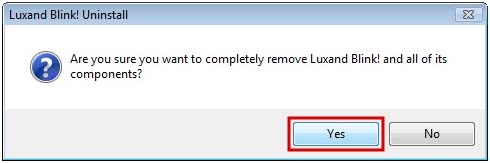
 

5. Click Yes to confirm the uninstallation process. The uninstaller removes Luxand Blink!’s files from the computer.
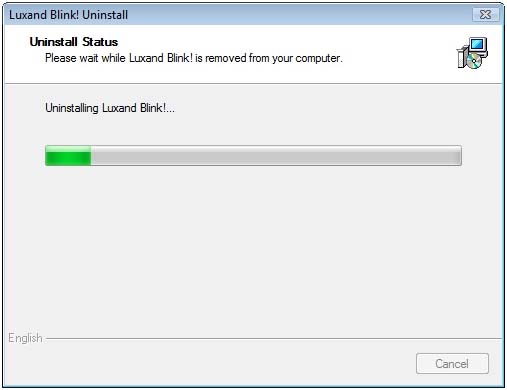
 

To uninstall Luxand Blink! from the Start menu, follow these steps:

1. Click Programs.

2. Select the Luxand - Blink! folder.

3. Click Uninstall Luxand Blink!.
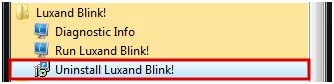
  

The Luxand Blink! Uninstaller window displays. Follow the same steps as above.

If you want to reinstall Luxand Blink!, click the setup file. You will be prompted to uninstall Luxand Blink!. Then click the setup file to begin installation.



Next chapterRecommendations

Contents

face recognition
Top Downloads

Blink! Pro
Log in to your PC by simply looking at it.
BabyMaker
Don't wait nine months to see your baby! All you need is two pictures.
ProphecyMaster
What Will You Look Like in 20 Years?
Glamourizer
Turn ordinary photos into glamour portraits, hundreds at a time.

Latest News

08.02.2012 Blink! Pro Learns to Hide
Blink! Pro Learns to Hide! The newest update allows you to hide Blink! Pro for greater security.

08.02.2012 Blink! Pro Learns to Learn
Blink! Pro Learns to Learn! The newest update allows you to train Blink! Pro for better facial recognition.

07.12.2011 FaceSDK 4.0 Released
FaceSDK 4.0 goes real-time, making better use of multi-core systems

face recognition

Solutions  |  Products  |  Download  |  Privacy  |  Support  |  Development  |  Press  |  About Luxand
© 2005-2012 Luxand, Inc.
face recognition
face recognition
face recognition
face recognition
